
Composite is a structural design pattern that lets you compose objects into tree structures and then work with these structures as if they were individual objects.
As described by Gof, “Compose objects into tree structure to represent part-whole hierarchies. Composite lets client treat individual objects and compositions of objects uniformly”.
When to Use ?
- When we you have to implement a tree-like object structure.
- When we want the client code to treat both simple and complex elements uniformly.
When not to use ?
- Different Stuff: If the things in your system (like unable to group objects together) are very different from each other, the Composite Pattern might not be the best fit. It works better when everything follows a similar pattern.
- Speed Issues: If your system needs to be super fast, the Composite Pattern could slow it down because of how it organizes things. In really speedy situations, simpler ways might be better.
- Always Changing: If your system keeps changing a lot, especially with things being added or taken away frequently, using the Composite Pattern might not be the easiest or most efficient way.
- Not Too Complicated: If your system isn’t very complicated and doesn’t have a lot of layers or levels, using the Composite Pattern might make things more complex than they need to be.
- Worried About Memory: If your system needs to use as little memory as possible, the Composite Pattern might use more than you’d like. In memory-sensitive situations, it might be better to use simpler methods.
Structure
- Component: The Component interface describes operations that are common to both simple and complex elements of the tree.
- Leaf: The Leaf is a basic element of a tree that doesn’t have sub-elements. Usually, leaf components end up doing most of the real work, since they don’t have anyone to delegate the work to.
- Composite: The Container (aka composite) is an element that has sub-elements: leaves or other containers. A container doesn’t know the concrete classes of its children. It works with all sub-elements only via the component interface.
- Client: The Client works with all elements through the component interface. As a result, the client can work in the same way with both simple or complex elements of the tree.

Examples
1.Let’s suppose we are building a financial application. We have customers with multiple bank accounts. We are asked to prepare a design which can be useful to generate the customer’s consolidated account view which is able to show customer’s total account balance as well as consolidated account statement after merging all the account statements. So, application should be able to generate:
1) Customer’s total account balance from all accounts
2) Consolidated account statement

from abc import ABC, abstractmethod

# Component
class AccountComponent(ABC):
    @abstractmethod
    def get_balance(self):
        pass

    @abstractmethod
    def get_statement(self):
        pass

# Leaf
class BankAccount(AccountComponent):
    def __init__(self, account_number, balance, statement):
        self.account_number = account_number
        self.balance = balance
        self.statement = statement

    def get_balance(self):
        return self.balance

    def get_statement(self):
        return f"Account {self.account_number} Statement:\n{self.statement}"

# Composite
class CustomerAccount(AccountComponent):
    def __init__(self, customer_name):
        self.customer_name = customer_name
        self.accounts = []

    def add_account(self, account):
        self.accounts.append(account)

    def get_balance(self):
        total_balance = sum(account.get_balance() for account in self.accounts)
        return total_balance

    def get_statement(self):
        consolidated_statement = f"Consolidated Statement for {self.customer_name}:\n"
        for account in self.accounts:
            consolidated_statement += account.get_statement() + "\n"
        return consolidated_statement

# Usage
if __name__ == "__main__":
    account1 = BankAccount("123456", 5000, "Transaction 1: +$100\nTransaction 2: -$50")
    account2 = BankAccount("789012", 7000, "Transaction 1: +$200\nTransaction 2: -$100")

    customer = CustomerAccount("John Doe")
    customer.add_account(account1)
    customer.add_account(account2)

    # Generate Customer’s total account balance
    total_balance = customer.get_balance()
    print(f"Customer's Total Account Balance: ${total_balance}")

    # Generate Consolidated account statement
    consolidated_statement = customer.get_statement()
    print(consolidated_statement)
Explanation:
In this example:
AccountComponentis the common interface for both leaf (BankAccount) and composite (CustomerAccount) objects.BankAccountrepresents a leaf object, which is an individual bank account with a specific account number, balance, and statement.CustomerAccountis the composite object that can contain multiple bank accounts and provides methods to calculate the total balance and generate a consolidated account statement.
The get_balance method is applied uniformly to both leaf and composite objects, allowing the calculation of the total account balance. The get_statement method is similarly applied to generate a consolidated account statement.
- Let’s consider a car. Car has an engine and a tire. The engine is made up of some electrical components and valves. Likewise how do you calculate the total price
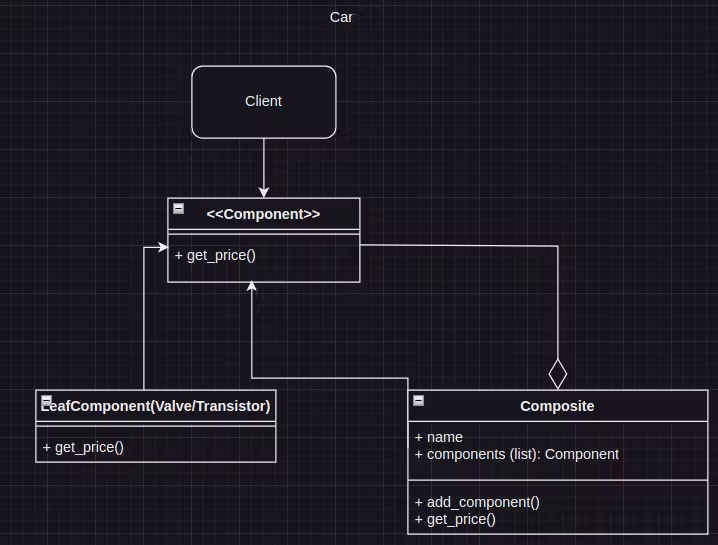
 from abc import ABC, abstractmethod

 # Component (Leaf)
 class Component(ABC):
     @abstractmethod
     def get_price(self):
         pass

 # Leaf
 class Transistor(Component):
     def get_price(self):
         return 10  # Just an arbitrary value for demonstration

 # Leaf
 class Chip(Component):
     def get_price(self):
         return 20  # Just an arbitrary value for demonstration

 # Leaf
 class Valve(Component):
     def get_price(self):
         return 15  # Just an arbitrary value for demonstration

 # Leaf
 class Tire(Component):
     def get_price(self):
         return 50  # Just an arbitrary value for demonstration

 # Composite
 class Composite(Component):
     def __init__(self, name):
         self.name = name
         self.components = []

     def add_component(self, component):
         self.components.append(component)

     def get_price(self):
         total_price = sum(component.get_price() for component in self.components)
         return total_price

 # Client code
 if __name__ == "__main__":
     # Creating leaf objects
     transistor = Transistor()
     chip = Chip()
     valve = Valve()
     tire = Tire()

     # Creating composite objects
     electrical_components = Composite("Electrical Components")
     electrical_components.add_component(transistor)
     electrical_components.add_component(chip)
     electrical_components.add_component(valve)

     engine = Composite("Engine")
     engine.add_component(electrical_components)

     car = Composite("Car")
     car.add_component(engine)
     car.add_component(tire)

     # Applying operation on leaf objects
     print(f"Transistor Price: {transistor.get_price()}")
     print(f"Chip Price: {chip.get_price()}")
     print(f"Valve Price: {valve.get_price()}")
     print(f"Tire Price: {tire.get_price()}")

     # Applying operation on composite objects
     print(f"Engine Price: {engine.get_price()}")
     print(f"Car Price: {car.get_price()}")
In this example:
Componentis the common interface for both leaf and composite objects.Transistor,Chip,Valve, andTireare leaf objects implementing theComponentinterface.Compositeis the composite object that can contain both leaf and other composite objects.
The get_price method is applied uniformly to both leaf and composite objects, demonstrating how the operation is recursively applied to the entire object hierarchy. The pricing example is kept simple for demonstration purposes. In a real-world scenario, you would likely have more complex pricing logic.
Do we need to stick hard to it ?
In scenarios where performance is critical, the overhead introduced by the Composite Pattern’s recursive structure can potentially impact speed. Here’s a simplified example illustrating this concept with a focus on speed:
For example, consider a performance-sensitive system that involves processing a large number of graphic objects.
Non Composite Approach
class Circle:
    def __init__(self, radius):
        self.radius = radius

    def draw(self):
        print(f"Drawing Circle with radius {self.radius}")

class Square:
    def __init__(self, side_length):
        self.side_length = side_length

    def draw(self):
        print(f"Drawing Square with side length {self.side_length}")

# Usage
circles = [Circle(5) for _ in range(1000000)]
squares = [Square(4) for _ in range(1000000)]

for circle in circles:
    circle.draw()

for square in squares:
    square.draw()
Composite Approach
class Graphic:
    def draw(self):
        pass

class Circle(Graphic):
    def __init__(self, radius):
        self.radius = radius

    def draw(self):
        print(f"Drawing Circle with radius {self.radius}")

class Square(Graphic):
    def __init__(self, side_length):
        self.side_length = side_length

    def draw(self):
        print(f"Drawing Square with side length {self.side_length}")

class CompositeGraphic(Graphic):
    def __init__(self):
        self.graphics = []

    def add(self, graphic):
        self.graphics.append(graphic)

    def draw(self):
        for graphic in self.graphics:
            graphic.draw()

# Usage
composite = CompositeGraphic()
for _ in range(500000):
    composite.add(Circle(5))

for _ in range(500000):
    composite.add(Square(4))

composite.draw()
From the above example we can see,
- The non-composite approach creates separate lists of circles and squares and iterates through each list to draw the shapes.
- The composite approach creates a composite object that contains both circles and squares and draws them through a single
drawmethod.
In a performance-sensitive scenario, the non-composite approach may be more efficient due to its simplicity and direct iteration through the lists.
The composite approach involves recursive calls through the composite structure, potentially introducing additional function call overhead, impacting speed.
Advantages:
- You can work with complex tree structures more conveniently: use polymorphism and recursion to your advantage.
- Open/Closed Principle. You can introduce new element types into the app without breaking the existing code, which now works with the object tree.
- Uniform treatment of leaf and composite objects.
- Its particularly useful when dealing with hierarchial structures.
- Scalability – we can easily new types of components to the entire hierarchy.
- Promotes encapsulation
Disadvantages
- It might be difficult to provide a common interface for classes whose functionality differs too much. In certain scenarios, you’d need to over generalize the component interface, making it harder to comprehend.
- If individual leaf objects have unique properties or behaviors, the Composite pattern may not be the best choice, as it enforces a uniform interface across all components. In such cases, you may need to resort to other patterns or adaptations.
- Storing hierarchy objects can consume memory if its deep.
 Syed Jafer K