
Today, i learnt about dead letter, an simple mechanism to handle undelivered message, expired message, basically missed one. In RabbitMQ, Dead Letter Exchanges (DLX) and Dead Letter Queues (DLQ) are essential mechanisms for handling undeliverable messages.
They allow you to isolate problematic messages for further analysis and troubleshooting, ensuring the smooth operation of your messaging system. In this blog we will dive into the details of how dead lettering works and how to configure it in RabbitMQ.
What is a Dead Letter?
A dead letter is a message that cannot be delivered to its intended queue or is rejected by a consumer. Common scenarios where messages are dead lettered include,
- Message Rejection: A consumer explicitly rejects a message without requeuing it.
- Message TTL (Time-To-Live) Expiry: The message remains in the queue longer than its TTL.
- Queue Length Limit: The queue has reached its maximum capacity, and new messages are dropped.
- Routing Failures: Messages that cannot be routed to any queue from an exchange.
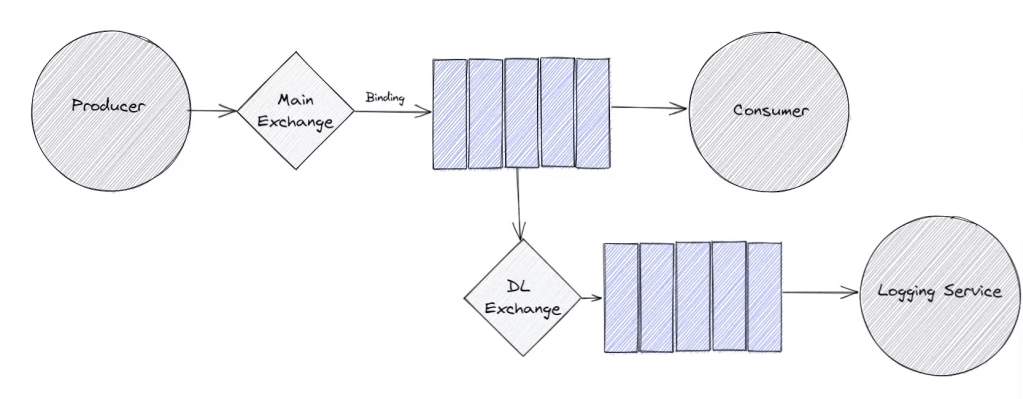
Dead Letter Exchange (DLX)
A DLX is a special type of exchange to which dead-lettered messages are routed. Each queue in RabbitMQ can be configured to use a DLX. When a message is dead-lettered, RabbitMQ republishes it to the DLX along with metadata that provides the reason for dead lettering.
How Dead-Lettering Works
- Message Arrives: A message is published to a queue.
- Dead-Lettering Triggered: One of the dead-lettering scenarios occurs.
- Re-Publishing to DLX: RabbitMQ repackages the message with additional headers and republishes it to the configured DLX.
- DLX Routing: The DLX routes the message to one or more dead-letter queues based on routing rules
Python Example: Dead Letter Queue Setup
Here is a Python example using the pika library to demonstrate setting up a DLX and DLQ.
import pika

# Connection parameters
connection = pika.BlockingConnection(pika.ConnectionParameters('localhost'))
channel = connection.channel()

# Declare Dead Letter Exchange and Queue
channel.exchange_declare(exchange='dlx_example', exchange_type='direct', durable=True)
channel.queue_declare(queue='dead_letter_queue', durable=True)
channel.queue_bind(exchange='dlx_example', queue='dead_letter_queue', routing_key='dead-letter')

# Declare Main Queue with Dead Letter Exchange settings
arguments = {
    'x-dead-letter-exchange': 'dlx_example',
    'x-dead-letter-routing-key': 'dead-letter'
}
channel.queue_declare(queue='main_queue', durable=True, arguments=arguments)

# Publish a message to the main queue
channel.basic_publish(exchange='', routing_key='main_queue', body='Hello, World!')

print("Message published to main_queue")

connection.close()
This script,
- Declares a DLX (
dlx_example) and a DLQ (dead_letter_queue). - Configures the
main_queueto usedlx_exampleas its DLX. - Publishes a test message to
main_queue.
Inspecting Dead-Lettered Messages
When messages arrive in the DLQ, you can inspect them for debugging. RabbitMQ attaches additional headers to each dead-lettered message,
x-death: Contains an array of information about why the message was dead-lettered.x-first-death-exchange,x-first-death-queue,x-first-death-reason: Provide details about the first dead-lettering event.
You can use tools like RabbitMQ Management UI or the rabbitmqadmin command-line tool to view message headers and properties.
Practical Use Cases for Dead Letter Queues
- Debugging: DLQs are invaluable for identifying patterns and issues in message processing.
- Retry Mechanisms: DLQs can be used in conjunction with retry logic to reprocess messages after a delay.
- Alerting: Monitor DLQs to detect and respond to unexpected issues in the system.
Best Practices for Dead Letter Queues (Not Tried Yet :))
- Separate DLQs: Use distinct DLQs for different types of messages or applications.
- Monitor DLQs: Regularly monitor DLQs to identify and address issues promptly.
- Limit Message TTL: Use TTL to prevent stale messages from clogging queues.
- Analyze x-death Headers: Leverage the
x-deathheader to analyze and resolve root causes of dead-lettering.
 Syed Jafer K