
Today, i started learning more on EDA (Event Driven Architecture). As a first step i asked this question on What is an Event ? . Is this same as messages that i put in Worker Queue, consumed by workers or is it different ? If different what does it contains ? In this blog i jot down my notes on Event and its composition.
In the ever-evolving world of software architecture, event-driven architecture (EDA) has emerged as a powerful paradigm for building scalable, responsive, and decoupled systems. At the heart of this architecture lies the concept of an event.
As event is the rigid concept that travels through the EDA. Let’s explore more on EDA.
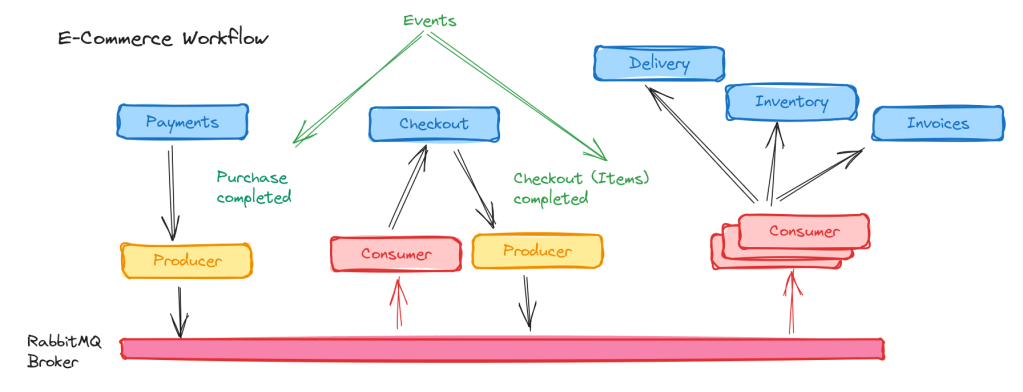
Defining an Event
An event is a record of a significant occurrence or change in the state of a system. It encapsulates information about something that has happened and serves as a trigger for further actions or workflows in an event-driven system.
Events are immutable, meaning they represent something that has already occurred and cannot be altered retroactively.
Examples of Events
- A customer places an order in an e-commerce application.
- A payment is successfully processed.
- A temperature sensor reports a change in temperature.
- A user clicks a button on a web page.
Core Characteristics of an Event (My Opinion from reading)
- Significance: An event represents a meaningful action or state change, such as creating a new user account or updating inventory.
- Immutability: Events are immutable records. Once an event is published, it cannot be changed; instead, new events are created to reflect subsequent changes.
- Lightweight: Events are designed to be lightweight, containing only the necessary information about the occurrence.
- State Representation: Events often represent a change in the state of a system (e.g., “OrderPlaced” changes an order’s state from pending to placed).
Components of an Event
My Opinion on Components, it can contain many.
Every event typically consists of the following components
Event Type
- Describes the nature of the event (eg., OrderPlaced, UserRegistered).
- Helps consumers to identify on processing the event. (Can also be redirected to individual queues)
Event Metadata
- Contains contextual information such as Timestamp, Source, CorrelationID.
- Timestamp: When the event occured.
- Source: Which system or component generated the event.
- Correlation ID: Links events related to the same workflow.
Event Payload
- The actual data relevant to the event.
- For example, an “OrderPlaced” event payload might include
{
  "orderId": 12345,
  "userId": 67890,
  "items": [
    { "productId": "A1", "quantity": 2 },
    { "productId": "B2", "quantity": 1 }
  ]
}
Types of Events
1. Discrete Events – These are one-time occurrences, such as a user clicking a button or a payment being processed.
2. Streaming Events – These occur as a continuous flow, such as real-time data from IoT sensors or log streams from a web server.
How Events are placed in Event-Driven Architecture ?
In EDA, events are the primary mechanism through which components communicate.
Here’s how events fit into the architecture,
Event Producers
- Generate and publish events.
- Example: An order service publishes an “OrderPlaced” event when an order is completed.

Event Channels
- Transmit events from producers to consumers.
- Examples: Message brokers like Apache Kafka, RabbitMQ, or Amazon SNS.
Event Consumers
- Listen to and process events.
- Example: An inventory service updates stock levels upon receiving an “OrderPlaced” event.
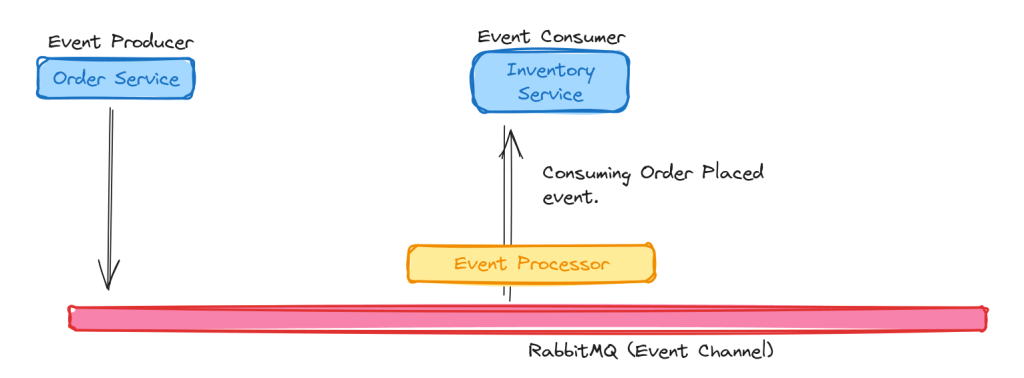
Event Processors
- Intermediate components that transform, filter, or aggregate events.
- Example: Enriching an event with additional user data before forwarding it to consumers.

Event Stores (Optional)
Persist events for historical analysis, debugging, or rehydrating system state.

So is it same as a TASK ?
While events and tasks are closely related, they serve distinct purposes in a system,
| Aspect | Event | Task |
|---|---|---|
| Content | Describes something that happened. | Provides input or instructions for work. |
| Purpose | Notify consumers of a state change. | Define actionable work to be done. |
| Consumer Behavior | Decides independently how to react. | Executes the specific action described. |
| Communication Pattern | Often many-to-many. | Typically one-to-one or one-to-few. |
Event Example:
Message:
{"type": "OrderPlaced", "orderId": 12345, "timestamp": "2025-01-18T12:00:00Z"}Purpose: Notify all interested services (inventory, analytics, notifications) that an order was placed. Each service decides its action.
Task Example:
Message:
{"action": "GenerateReport", "userId": 123, "startDate": "2025-01-01", "endDate": "2025-01-10"}Purpose: Pass specific instructions to a report generation service to execute this action.
How Event and Task are related with each other ?
- Event Occurs: An event is published when something meaningful happens in the system. For example, an order is placed.
- Task Triggered: The event triggers one or more tasks based on predefined business logic. For instance, the
"OrderPlaced"event might trigger tasks such as:- Deducting inventory.Notifying the warehouse.Sending a confirmation email to the customer.
- Task Execution: Tasks are executed asynchronously or synchronously, depending on the system’s design.
In the upcoming blogs, we will dive much deeper into EDA.
 Syed Jafer K